This QuickStart lists all the new and public beta features released, as well as bugs fixed in November 2025.
It is summary in nature, and you should refer to the specific Sigma documentation links provided for more information.
Public beta features will carry the section text "Beta".
All other features are considered released (GA or generally available).
Sigma actually has feature and bug fix releases weekly, and high-priority bug fixes on demand. We felt it was best to keep these QuickStarts to a summary of the previous month for your convenience.
New first Friday features QuickStarts will be published on the first Friday of each month, and will include information for the previous month.
Subscribe to What's New in Sigma
For those wanting to see what Sigma is doing on each week, release notes are now also available on the Sigma Community site. There, you can opt in to receive notifications about future release notes in order to stay on top of everything new happening at Sigma. You can also subscribe to automated updates in any Slack channel using the Sigma Community release notes RSS feed.
For more information on how to subscribe to release note notifications, see About the release notes
For more information on Sigma's product release strategy, see Sigma product releases
If something is not working as you expect, here's how to contact Sigma support

Add a key file for Snowflake key pair connections
When configuring a Snowflake connection, you can add a PKCS#8-formatted key file (.p8) instead of pasting your private key when setting up key pair authentication for the connection or an OAuth service account.
Why it matters:
This improves security and operational hygiene by allowing teams to manage keys as files instead of pasting sensitive material into UI fields.
For more information, see Connect to Snowflake
Audit log regional support
Sigma now supports audit log events for organizations hosted in the GCP KSA and Azure EU (West Europe) regions.
Why it matters:
Enables compliance and operational observability for customers operating in additional cloud regions, supporting local regulatory requirements.
For a list of all supported regions, see Enable or disable audit logging
Enable a unique SAML SP entity ID (GA)
When setting up SAML-based authentication for a Sigma organization, you can now assign a unique service provider (SP) entity ID for the SAML configuration.
With the unique entity ID for Sigma as an SP, you can configure your IdP to allow SAML authentication to multiple Sigma organizations.
Why it matters:
This is essential for enterprises running multiple Sigma environments (dev, test, prod) or multi-tenant deployments, simplifying identity governance across orgs.
For more information, see Enable unique SAML entity IDs
Ask follow-up questions in Ask Sigma 
Ask Sigma now supports asking follow-up questions about your data.
After you ask a question in Ask Sigma, you can continue the conversation, asking Ask Sigma to continue the analysis or change the analysis. To start a new conversation, click Reset.
Why it matters:
This turns Ask Sigma into a conversational analysis tool, allowing iterative exploration instead of restarting from a single-question workflow.
For more information, see Ask natural language queries with Ask Sigma
Ask Sigma supports data model relationships and Snowflake semantic views
When Ask Sigma responds to questions with a data model or Snowflake semantic view, Ask Sigma can join related tables to provide higher-quality answers.
If you want to ask questions directly of a semantic view, browse to the semantic view in the data catalog and use Ask Sigma on the semantic view.
Why it matters:
Ask Sigma can now leverage governed relationships and semantic definitions, ensuring answers align with business logic and reduce join ambiguity.
For more information, see Ask natural language queries with Ask Sigma
New export API rate limits
The following endpoints now have rate limits:
- The Export data from a workbook (POST v2/workbooks/{workbookId}/export) endpoint is rate limited to
100 requests per minute. - The Export a workbook (POST v2/workbooks/{workbookId}/send) endpoint is rate limited to
100 requests per minute.
Why it matters:
Rate limits ensure stable platform performance and prevent accidental overuse from automated systems or batch workflows.
For all rate limits, see Get started with the Sigma REST API
1: On Snowflake connections, using the specifier %A in the format argument of the DateFormat function returned the abbreviated name for the day of the week.
Now, it returns the full name for the day of the week as expected. To return the abbreviated day, use the specifier %a.
2: The Ask Sigma usage dashboard was unavailable to some organizations.
3: Content validation now updates elements from a data model used in a join.
4: Content validation was incorrectly performed on tagged versions of workbooks that used an untagged version of a data model as the source, causing those tagged versions to display errors.
5: Tagged versions with errors caused by content validation continue to display errors until they are re-tagged.
6: The :hide_explore_toggle parameter now hides the Show customize panels option in the element menu.
7: In some cases, the Edit option in securely embedded content was not functional.
Create sparklines in a table (GA)
The ability to create sparklines in a table is now generally available. You can now also configure sparkline tooltips and endpoint labels.
Why it matters:
Sparklines add compact trend visibility directly in tables, enabling quick pattern detection without creating separate charts.
For more information, see Create sparklines in a table
If/else control flow in action sequences (GA)
Use if/else statements to create dynamic workflows within action sequences.
If/else control flow adds flexibility to a sequence by allowing it to check one or more conditions and execute actions for the first condition that evaluates to true.
The key advantages of using an if/else control flow are:
- Simplify action workflows by consolidating multiple conditions into a single sequence. See an example use case with and without if/else
- Set conditions that reference results of previous actions in the sequence, including called stored procedures. See an example sequence that calls a stored procedure then uses the returned value to apply different logic in the if/else statement
- Prevent workflow errors and incomplete logic by using an else component to define a default action path.
Why it matters:
Action sequences can now support branching logic, enabling far more sophisticated data apps and automation flows without external orchestration tools.
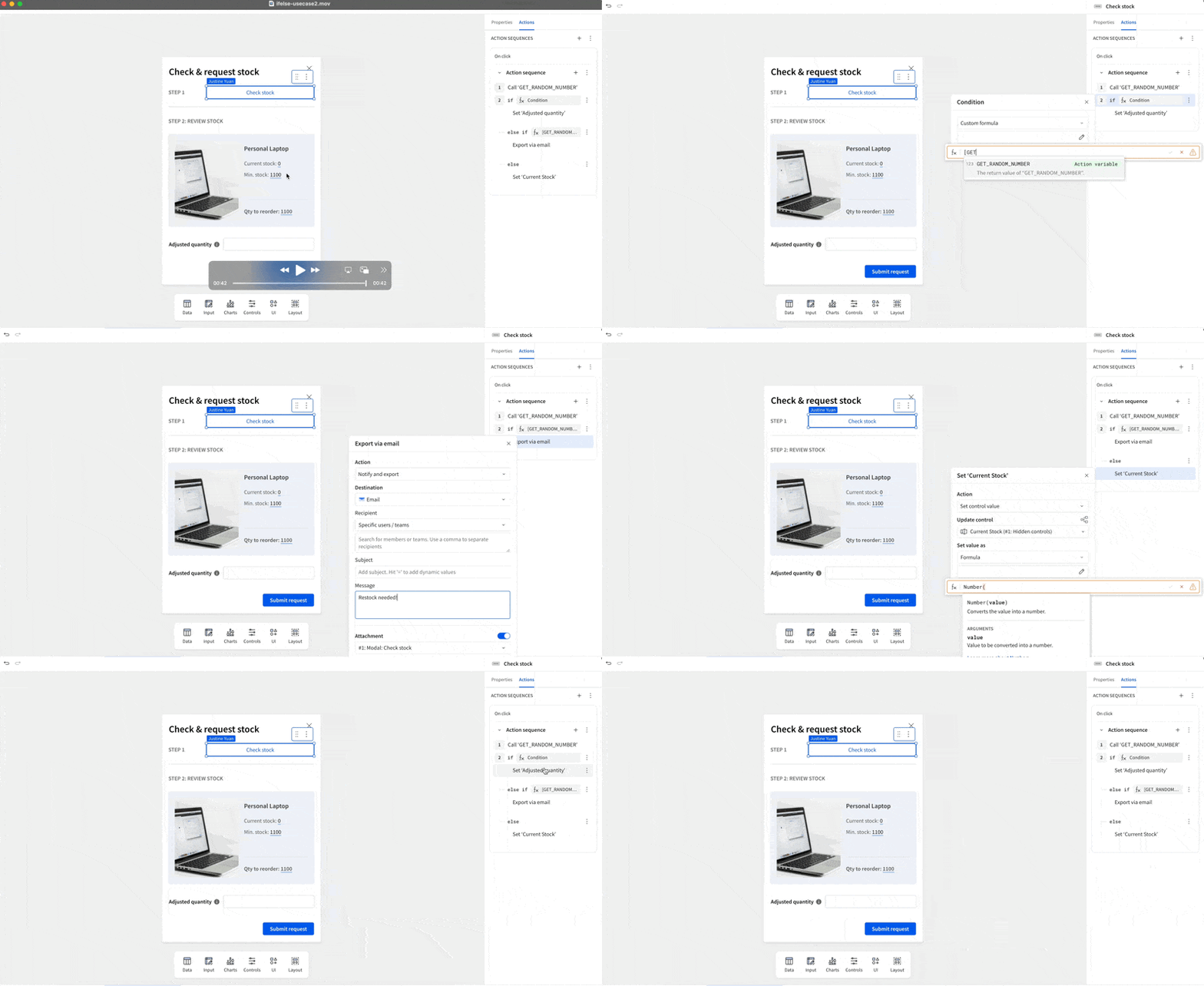
For more information, see Build if/else control flow in an action sequence
CSV upload number parsing (Beta)
When a column in an uploaded CSV file contains numbers with separators (commas, periods, spaces, etc.), Sigma parses the data as text strings by default.
To parse the data as numbers, you can choose one of the following options:
- Auto-detect: Sigma automatically detects the format pattern and parses the data as numbers accordingly. Sigma can currently detect US standard number format and European number format.
- Custom format: Specify the number format pattern for Sigma to parse.
Why it matters:
Data loading becomes more resilient to regional formatting differences, reducing the need for cleanup before analysis.
For more information, see Parse numbers with separators
Validate content in a data model (Beta)
When you make changes to a data model, those changes affect users of workbooks that use the data model as a source.
You can now validate content to prevent breaking changes to those workbooks.
Instead of manually replacing and updating deleted or changed columns and elements in affected documents, you can validate content in the data model and prevent these errors.
Why it matters:
This adds a governance safety net for model changes, preventing downstream workbook breakage and reducing maintenance overhead.
For more information, see Validate content in a data model (Beta) and Sync a draft with the latest published version
Copy paste elements across embedded content
Sigma now supports copy pasting elements from one embed to another. To support this in embedded content, update your iframe to allow copy paste actions.
For example:
<iframe src="<embed URL>" allow="clipboard-read; clipboard-write">
For more information, see Manage iframes for embeds
Edit input tables account type permission (Beta)
The ability to edit input table data is now enabled through the new Edit input tables account type permission. By removing it from the Basic explore permission, Sigma allows admins to provision input table editing separately from explore capabilities like viewing unaggregated underlying data, using drill paths, filtering columns, etc.
Why it matters:
Separating edit rights from explore rights gives admins more granular control over who can change structured inputs.
For more information, see Account type permission availability matrix
Improved error handling for non-compliant write-ahead logging (WAL) schema
Sigma now detects when input table edits are unsuccessful due to a non-compliant write-ahead log (WAL) schema.
This occurs when a user makes one or more changes to the schema in the data platform, leaving Sigma unable to write data to the WAL.
When this error (wrong schema for WAL table) is detected, Sigma sends an email to admins containing information about the error and a link to troubleshooting guidance.
Why it matters:
Quicker diagnosis of WAL schema issues reduces downtime and avoids silent failures during data entry.
For more information, see Troubleshoot input table connection issues
Input table editing for workbook viewers (Beta)
Data entry permission on input tables now includes a new option:
- Editable in published version - all users
When this option is selected, any user with the Edit input tables permission enabled on their account type and access to the workbook—including those granted Can view access—can edit input table data.
Why it matters:
This expands collaborative data entry to a broader audience while still respecting account-type-based edit controls.
For more information, see Change the data entry permission on input tables
PostgreSQL input table support (GA)
Input table support on PostgreSQL connections is now generally available.
Input tables enable structured data entry, allowing you to add new data points, update existing inputs, and supplement existing data from your data platform.
Why it matters:
Organizations using PostgreSQL can now enable governed, write-back data entry workflows without needing Snowflake or BigQuery.
For more information about input tables and how to use them, see the following documentation:
Intro to input tablesCreate new input tablesEdit existing input table columns
Version tagging for input tables (Beta)
You can apply version tags to documents that contain input tables, creating a copy of the input table data in the tagged version.
Optionally, you can create the copy on a different connection than the original input table.
Why it matters:
This allows stable reference versions of input data for audits, snapshots, or long-running analysis workflows.
For more information, see Use input tables with version tagging
Connect Snowflake Intelligence to Sigma Workbook
Chat with your Snowflake Cortex Agents directly inside Sigma—no external tools, 100% warehouse-native.
In ~45 minutes you'll build a workbook where users can select agents, ask natural-language questions, and seamlessly transition from AI responses to structured analytics.
You'll learn to:
- Set up Snowflake Intelligence and create Cortex Agents
- Configure secure API access with service users, roles, and Programmatic Access Tokens (PAT)
- Build a stored procedure that invokes Cortex Agents via REST API
- Create a Sigma workbook with input tables and actions for agent interactions
- Log all conversations for audit and analysis
- Connect agents to your data using custom tools and functions
Perfect for Snowflake users who want AI-powered analytics without leaving their data warehouse—ask questions in natural language, then immediately dive into Sigma's full visualization and computation capabilities.
For more information, see Connect Snowflake Intelligence to Sigma Workbook
Add user-added text translations for default locales
You can now add user-added text translations for both default and non-default locales in a workbook.
Previously, uploading and downloading user-added text translations was only supported for non-default locales.
For more information, see Manage workbook localization
Updated Exports tab in Administration
The Exports tab in Administration has been updated with additional functionality and information.
You can now:
- Filter export schedules by when they were last run.
- Retry errored exports.
- View additional information like when your export was last run and the current status of each scheduled export.
For more information, see Manage organization schedules
Add CC and BCC recipients to emailed exports
You can now specify CC or BCC recipients in ad hoc and scheduled exports by entering a comma-separated list of email addresses or team names.
Why it matters:
This makes automated reporting workflows more flexible and reduces the need to forward reports manually.
Minimum element size removed
Minimum element size is now a suggestion for all elements.
When resizing, Sigma indicates when an element is below the recommended size, but allows you to resize it regardless.
Elements below the recommended size might experience minor visual issues depending on the element, contents, and display.
Why it matters:
Designers have more freedom to create compact dashboards and fine-tune layout density.
Run Python code (Beta)
Add a Python element to any workbook or data model to write and run Python code.
Support for Python code is now available for organizations with a connection to Snowflake.
For more information, see Set up a Snowflake connection for Python (Beta)
You can write Python code that performs complex tasks like data transformation, data analysis, forecasting, prediction, or retrieve and send data to third-party API endpoints. When writing Python in Sigma, you can also:
- Reference data elements like tables, pivot tables, and input tables as DataFrames.
- Incorporate user input into your code by referencing control values.
- Build tables and charts with the output from your Python code.
- Use autocomplete to reference data sources available in your connection.
- Import libraries, including custom libraries, configured when you set up the connection.
- Run Python code directly on the Python element, or trigger the code to run from an action. Workbooks with a Python element can be exported and embedded.
Why it matters:
This brings advanced analytics, forecasting, and custom computations directly into Sigma without moving data or relying on external services.
For more information, see Write and run Python code in Sigma
Version tagging for warehouse views (Beta)
You can create warehouse views from a tagged version of a workbook or data model.
By creating a warehouse view from a tagged version, you can maintain a stable query for a virtual table in your warehouse, regardless of changes made to the published version.
Why it matters:
Tagged views ensure stable, reproducible queries even when your published version evolves — essential for downstream reporting.
For more information, see Use warehouse views with version tagging
Vertical alignment options for controls
All control types (except the legend control) now have vertical alignment options, allowing you to change the position of the control within the element boundaries to the top, center, or bottom.
Why it matters:
Improves dashboard layout precision and helps better align controls within complex designs.
Additional Resource Links
Blog
Community
Help Center
QuickStarts