This QuickStart lists all the new and public beta features released, as well as bugs fixed in December 2025.
It is summary in nature, and you should refer to the specific Sigma documentation links provided for more information.
Public beta features will carry the section text "Beta".
All other features are considered released (GA or generally available).
Sigma actually has feature and bug fix releases weekly, and high-priority bug fixes on demand. We felt it was best to keep these QuickStarts to a summary of the previous month for your convenience.
New first Friday features QuickStarts will be published on the first Friday of each month, and will include information for the previous month.
Subscribe to What's New in Sigma
For those wanting to see what Sigma is doing on each week, release notes are now also available on the Sigma Community site. There, you can opt in to receive notifications about future release notes in order to stay on top of everything new happening at Sigma. You can also subscribe to automated updates in any Slack channel using the Sigma Community release notes RSS feed.
For more information on how to subscribe to release note notifications, see About the release notes
For more information on Sigma's product release strategy, see Sigma product releases
If something is not working as you expect, here's how to contact Sigma support

Enable multiple identity providers for your organization (Beta)
You can now enable multiple identity providers (IdPs) for your Sigma organization. If you would like to enable multiple IdPs for your organization, please contact Sigma support.
For more information, see Using multiple identity providers for your Sigma organization (Beta)
Turkish now supported as a workbook locale
You can now set Turkish (tr-tr) as your workbook locale. Apply the Turkish language, date format, and currency to workbook previews and embedded workbooks.
For more information, see Manage workbook localization
Updated authentication method for Snowflake Partner Connect connections
New and existing connections to Snowflake created from Snowflake Partner Connect are authenticated using key pair authentication instead of basic authentication.
For more information, see Connect to Snowflake
Ask Sigma supports data model relationships and Snowflake semantic views
When Ask Sigma responds to questions with a data model or Snowflake semantic view, Ask Sigma can join related tables to provide higher-quality answers.
For more information, see Ask natural language queries with Ask Sigma
Ask follow-up questions in Ask Sigma 
Ask Sigma now supports asking follow-up questions about your data. After you ask a question in Ask Sigma, you can continue the conversation, asking Ask Sigma to continue the analysis or change the analysis. To start a new conversation, click Reset.
As part of this change, you can no longer pass a prompt to Ask Sigma using a query string parameter and share questions in a custom URL.
For more information, see Ask natural language queries with Ask Sigma
New AI model versions available
If you have an AI provider configured to use a Databricks connection, or to use Gemini as an external AI provider or through a BigQuery connection, the model version used by Ask Sigma and other AI features has been updated:
- Databricks connections now use databricks-claude-sonnet-4-5
- BigQuery connections now use Gemini 2.5 Flash = Gemini as an external AI provider now uses Gemini 2.5 Flash
For more information, see Configure warehouse AI model integration and Manage external AI integrations
Ability to copy bookmarks when duplicating a workbook
The Duplicate a workbook (POST /v2/workbooks/{workbookId}/copy) endpoint now includes the copyBookmarks parameter that determines if saved views (formerly called bookmarks) are copied from the duplicated workbook.
- If set to all (available to admins only), every saved view (bookmark) applied to the workbook is copied.
- If set to accessible, only personal saved views and those shared with the user initiating the operation are copied.
- If not set, saved views are not copied.
Ownership of all saved views in the duplicate workbook transfers to the user initiating the operation.
Data models included in the response for the List files and List member files endpoints
The List files (GET /v2/files) and List member files GET /v2/members/{memberId}/filesendpoint includes data models in the response.
Data models are listed with a type of data-model and datasets are listed with a type of dataset.
New options for Lookup a connection and Sync a connection by path endpoints
The Look up connections by path POST /v2/connection/{connectionId}/lookup and Sync a connection by path POST /v2/connections/{connectionId}/sync endpoints include the option to look up or sync a stored procedure object in your connection.
Unpaginated responses from list endpoints (Deprecated)
This deprecation was previously announced in Sigma's release notes on October 3, 2025. This updated announcement includes an official end of support date.
Returning unpaginated responses from list endpoints is now deprecated. On June 2, 2026, this functionality will reach end of support and the following list endpoints did not return a paginated response will only return a paginated response:
- List members (GET /v2/members)
- List teams (GET /v2/teams)
- List workspaces (GET /v2/workspaces)
- List materialization schedules for a workbook (GET /v2/workbooks/{workbookId}/materialization-schedules)
- List scheduled exports for a workbook (GET /v2/workbooks/{workbookId}/schedules)
If you use these endpoints, update your API requests to include the limit query parameter to return a paginated response. After the end of support date, requests without the limit parameter return a paginated response of the default page size (50).
If you are already using the paginated response from list endpoints, no action is needed.
1: For a data element sourced from a grouped table with one or more grouping levels collapsed, source columns were unavailable to select instead of being available.
2: When a data model was embedded, users only had the option to rename a data model from the list of documents instead of from the document menu for the data model.
3: When a page was duplicated that contained a data element with a data model metric and the element source was located on the same page, the metric displayed an "Invalid Query" error instead of data calculated by the metric.
4: When sharing workbooks across organizations, users received an "Object Does Not Exist No matching record" error when attempting to replace the source of the shared workbook with a dataset.
5: When a user triggers an action that exports a PDF via email, Sigma now adheres to the page size selected in the action configuration.
6: When migrating a dataset sourced by two joined datasets to a data model, the join is recreated correctly.
Column-level security in data models with user attributes (GA)
Set column-level security (CLS) rules in a data model according to the assigned value of a user attribute.
Users and team members assigned a user attribute value that matches the value specified in the CLS rule can view the contents of the protected column. Users assigned other user attribute values, or not assigned a user attribute value, cannot view the contents of the protected column.
For more information, see Configure column-level security in a data model
Datasets (Deprecated)
On June 2, 2026, datasets will reach end of support and creating new datasets and editing existing datasets will no longer be available.
Migrate existing datasets to data models, and update any documents that use datasets as a source to use data models instead.
Migrate a dataset to a data model (Beta)
Create a data model from a dataset and its links by choosing to migrate a dataset. Optionally choose to update documents that reference the dataset automatically.
When you migrate a dataset, the dataset is unchanged and the contents of the dataset are recreated in the data model. You can also track the status of all datasets in your organization.
For more information about how to migrate a dataset and what is and isn't migrated to the new data model, see Migrate a dataset to a data model
Securely embed data models (Beta)
If you securely embed Sigma with a JWT-signed URL, you can embed Sigma data models into your client application. All JWT claims and embed query string parameters are supported for embedding a data model.
The URL structure for embedding a data model is the same as embedding a workbook. Use the following URL structure to embed a data model:
https://app.sigmacomputing.com/<organization-slug>/data-model/<dataModelName>-<dataModelId>
For more information, see Create an embed API with JSON Web Tokens
ConvertTimezone function accepts dynamic arguments
The ConvertTimezone function now accepts a column of IANA time zones in the timezone and from_timezone arguments.
For more information, see ConvertTimezone
Popular Functions
This new QuickStart highlights Sigma's most frequently used functions (according to CS) through practical, retail-data examples—covering the core patterns users rely on every day.
- Categorize values with BinFixed and BinRange
- Handle nulls cleanly with Zn and Coalesce
- Search and classify text with Contains and RegexpExtract
- Filter efficiently with In, IsNull, IsNotNull
- Enrich analysis using Lookup
- Understand contribution with PercentOfTotal and Subtotal
- Apply clean multi-condition logic with Switch
These patterns cover the 80/20 of everyday workbook building—categorizing values, fixing nulls, parsing strings, enriching with lookups, and calculating contributions without SQL detours. Faster builds, fewer mistakes, clearer insights.
A full, prebuilt workbook template is available so users can explore every example without building the workbook themselves. Great for learning the functions quickly or using the workbook as a reference model.
The Common Date Functions QuickStart also has a template now too!
OAuth 2.0 & PKCE for Secure Data Integration
This conceptual QuickStart breaks down how to use OAuth 2.0 with PKCE to secure Sigma's access to cloud data platforms—especially in embedded scenarios.
Security teams and architects need a clear, shared model for how Sigma authenticates and queries on behalf of users.
This QS gives a vendor-neutral, implementation-aware overview that you can use to:
- Pick the right pattern for your Sigma deployment (internal vs embedded, per-user vs service account)
- Understand where PKCE fits and how Sigma supports
- Talk credibly with security, platform, and app teams about risk, audibility, and compliance
IMPORTANT NOTES: Conceptual only — no hands-on build or trial setup required Aimed at security architects, data platform owners, and embedding developers who need a design-level view
Implicit TLS now supported for custom SMTP servers
You can now use implicit Transport Layer Security (TLS) when configuring custom SMTP servers by using port 465.
For more information, see Configure a custom SMTP server
Set up an app for two-factor authentication (GA)
If you use a username and password to log in to Sigma, you can set up an authenticator app to generate two-factor authentication codes instead of having codes sent to your email address.
You can turn off the app-based two-factor authentication at any time, or an admin can reset it, to receive two-factor authentication codes via email instead.
For more information, see Set up an app for two-factor authentication
Add Cc and Bcc recipients to email bursts
You can now add Cc and Bcc recipients to email bursts.
For more information, see Export as email burst
Aggregate totals across higher grouping levels (GA)
When displaying subtotals in your pivot table, you can now change whether the row subtotals are aggregated and displayed just for the immediate parent pivot rows, or also displayed at higher grouping levels.
For more information, see Aggregate totals across higher grouping levels (Beta)
Auto-update page anchor names in the navigation element
When the name of a page anchor is changed, the names of any associated navigation options in a navigation element now automatically update to match the new name.
Change divider stroke styles
You can now change the Stroke style for divider elements to Solid, Dashed, or Dotted.
For more information, see Divider in Intro to UI elements.
Conditional background colors for containers
You can configure formatting rules that conditionally change the background color of a container. For more information, see Style a container
Create and filter hierarchies (Beta)
Use hierarchies to group columns categorically and define the order of data granularity. When you create a hierarchy, you can:
- Define the order of the hierarchical data.
- Easily visualize all parts of the hierarchy together in a pivot table or grouped table.
- Format all levels of the hierarchy consistently, such as when applying conditional formatting.
If your hierarchical data is ragged, Sigma visualizes the ragged hierarchy, letting you view your hierarchy in a dense layout instead of empty rows like a non-ragged hierarchical view.
For more information about creating a hierarchy column, see Work with hierarchies and the function reference for the RaggedHierarchy function
After you create a hierarchy, you can filter different levels of the hierarchy using a filter on the data element or with a hierarchy control element.
For more information, see Hierarchy control
Customize page headers (GA)
You can enable custom page headers to appear on one or more workbook pages.
Page headers allow you to repeat contents like titles, filters, or navigation options across multiple pages in a single configuration.
Scroll options allow you to create a sticky header that moves with the user as they scroll.
For more information, see Add custom page headers to a workbook
Customize text fonts and sizes
You can now use custom fonts and sizes for text elements, in addition to using preset text styles, by using Break style and Restore style.
For more information, see Text elements
Image backgrounds for containers
You can configure background images for containers from an upload, as well as static and dynamic image URLs.
For more information, see Style a container
Legacy workbook layout (Deprecated)
The classic or legacy workbook layout is deprecated.
On March 3, 2026, editing of workbooks with legacy (non-grid) layouts will be disabled and you must upgrade workbooks to grid layout.
On June 2, 2026, this functionality will reach end of support and workbooks will be automatically upgraded when the workbook is opened.
For more information, see upgrade workbooks to grid layout
Navigation element (GA)
You can use the navigation element to display a list of destinations users can visit.
The navigation element shows each option as an individual button, which you can configure to send users to a workbook page, workbook element, or external link when clicked. Submenus allow you to nest additional navigation options under a top-level option.
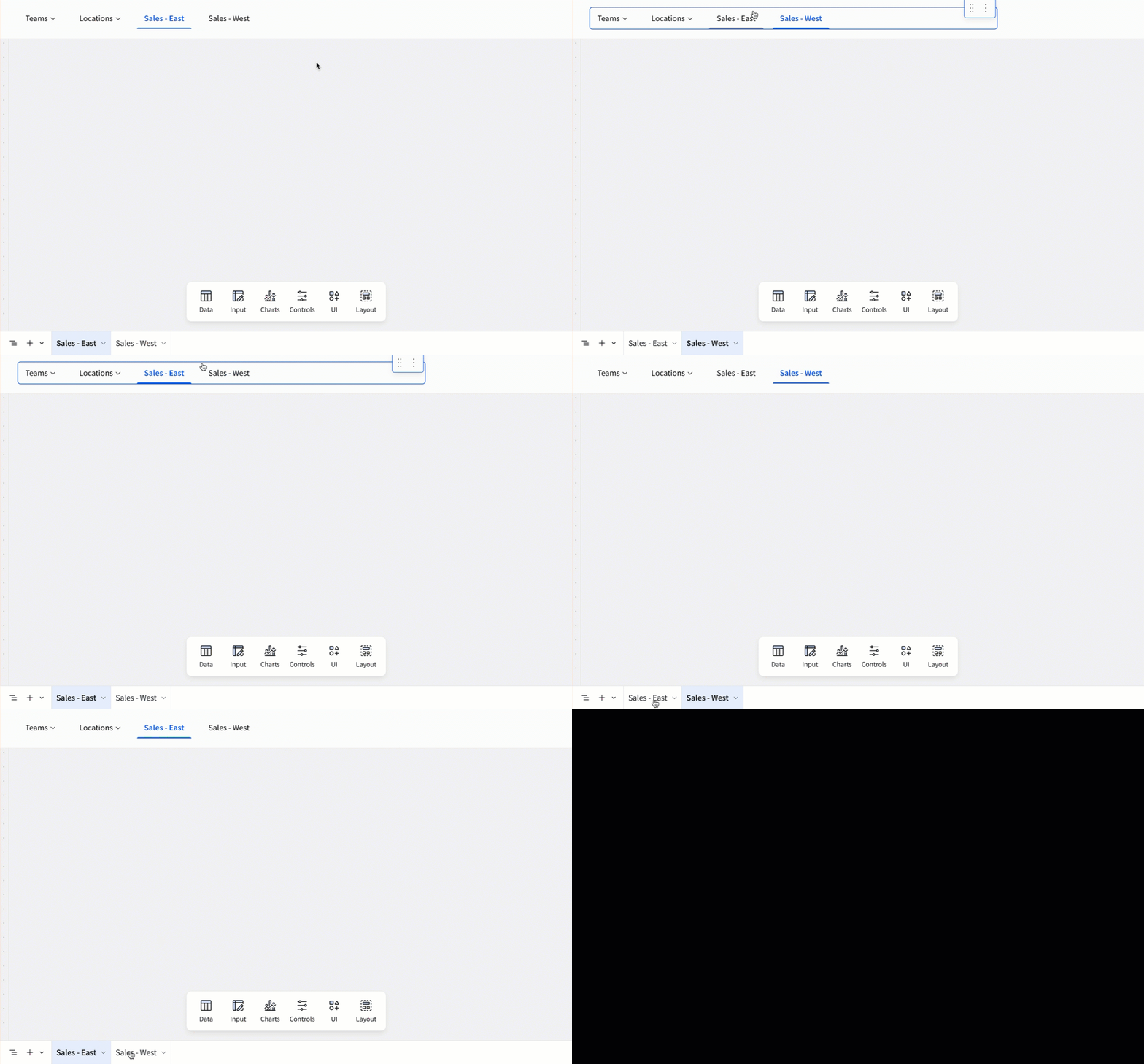
For more information, see Use the navigation element to guide user exploration
Reference multi-select control values in custom SQL
You can now reference the selected values of a multi-select list values control in custom SQL queries.
The selected values can be used to filter results in subqueries and CTEs, combined with formulas like ArrayLength, and more.
For more information, see Reference multiple values from a multi-select list in SQL
Select all search results in list and hierarchy filters and controls
When using search in a list or hierarchy filters and controls, you can now select all values from the search results.
Worksheets and dashboards (Deprecated)
Worksheets and dashboards are now deprecated (dataset worksheets continue to be supported).
To ensure continued access to your content, convert worksheets and dashboards to workbooks.
On March 3, 2026, editing of worksheets and dashboards will be disabled.
On June 2, 2026 this functionality will reach end of support and existing worksheets and dashboards will no longer be available.
For more information, see convert worksheets and dashboards to workbooks
Additional Resource Links
Blog
Community
Help Center
QuickStarts